
SQL Server Table Partitioning in Large Scale Data Warehouse 3
This post is the last part on series of table partitioning, as plan this part is going to focus on some advanced topics like partition merge, split, conversion and performance optimization in terms of different business demands.
The first thing we will talk about might be interesting, we know one benefit of table partitioning is speed up loading and archiving data, we can easily feel the performance improvement on query against large data after table partitioning, but data archiving is not that apparent and it’s on the lower file system level to helps you mange data more on the backend efficiently by file group and database file. After all, we are intent to manage data through partitions and additionally, manage partitions through database files, but that is not that straight forward.
Efficient way to manage partition using database file group and file
We might suppose out data would be stored like below if table is partitioned by month:
- January -> partition number 1
- February -> partition number 2
- …
- November -> partition number 11
- December -> partition number 12
The similar situation on daily partition:
- Day 1 -> partition number 1
- Day 2 -> partition number 2
- …
- Day 29 -> partition number 29
- Day 30 -> partition number 30
- Day 31-> partition number 31
Let’s assume we have daily transaction table currently has 31 partitions for each month, which is supposed to store daily data to corresponding partition in terms of partition number (1 to 31) and we also create 31 database files under the same file group (one file group for each month), which is supposed to have connection to their corresponding partitions in terms of file number (1 to 31).
but, the question is that is data really saved in partition as above pattern showed? and Is partition number really associated with corresponding database file?
The answer is no, actually the data will evenly spread to all partitions and each database file associates with all partitions. But how come we say table partitioning is the good way to mange our data and data file, the solution is file group.
- Create multiple file groups in stead of single file group
- Manage monthly partition data, we can create 12 file groups for each month with number 1 to 12 instead of one single file group with suffix of year. E.g.
- Create file group
BUSINESS_DB_FG_TRANS_202001...202012 - Don’t create file group ‘BUSINESS_DB_FG_TRANS_2020`
- Create file group
- Manage monthly partition data, we can create 12 file groups for each month with number 1 to 12 instead of one single file group with suffix of year. E.g.
- Create single database file under its corresponding file group.
- Manga monthly partition data, we can only create single data file under each file group
- Create
BUSINESS_DB_F_TRANS_202001under file groupBUSINESS_DB_FG_TRANS_202001
- Create
- Manga monthly partition data, we can only create single data file under each file group
- Create partition scheme which will carry the partition function to associate with file group
In this way, data will be loaded into the right file group and right database file, in another word, we can say January 2020 data is allocated at database file BUSINESS_DB_F_TRANS_202001 under the file group BUSINESS_DB_FG_TRANS_202001
Above all, multiple file groups and single file mode, which is the efficient way to manage data, we can assign initial, auto growth and limited size in terms of daily or monthly data volume. If we keep single file group for daily or monthly partition table, we can create any number of files as long as assign the right initial, auto growth and limited size number, but we lose control from physical data management point of view.
Partitions merge, split and use case for dealing with transaction data rollup
In this selection, we talk about partition merge and split, actually, they are technics of data management. In production, we either merge partitions or split them in according to data storage and management needs, let’s assume we have daily transaction table with 365 partitions for each year, now think about do you want to keep that mange partitions or you want to rollup to a monthly partition table so that there are only 12 partitions in each year, obviously, in most of case, we choose rollup transaction data into monthly partition table because that is much easier to maintain partitions such as yearly partition expansion for future year data allocation.
In another side, what if we get a big chunk of data such as 5 years sales and order data, do you want to keep this big volume data or you want to split it by year or month into different partition, apparently, it’s more efficient to partition table by year or month.
Now, let’s see how do we apply partition merge to daily transaction data rollup.
Basic setups before daily partition merge into monthly partition
In this use case, we need two partition tables, one is daily partition table we named it trans_current, it has below setups
file group: BUSINESS_DB_FG_TRANS_2020
partition function: BUSINESS_DB_PF_TRANS_CURRENT
1
2
create partition function BUSINESS_DB_PF_TRANS_CURRENT
AS range left values (20200101, 20200102,...,20201230,20201231) gopartition scheme: BUSINESS_DB_PS_TRANS_CURRENT
1
2
3
create partition scheme BUSINESS_DB_PS_TRANS_CURRENT
as partition BUSINESS_DB_PF_TRANS_CURRENT to
(BUSINESS_DB_FG_TRANS_2020,...,BUSINESS_DB_FG_TRANS_2020)the another table is monthly partition table, its name is
trans, it has below setupsfile group: BUSINESS_DB_FG_TRANS_2020
partition function: BUSINESS_DB_PF_TRANS
1
2
create partition function BUSINESS_DB_PF_TRANS
as range left for values (20200131, 20200228,...,20201130,20201231) goWe will do the partition switching after merge so that the partition function of monthly table set up like above as the last day of month to be boundary value.
partition scheme: BUSINESS_DB_PS_TRANS
1
2
3
create partition scheme BUSINESS_DB_PS_TRANS
as partition BUSINESS_DB_PF_TRANS to
(BUSINESS_DB_FG_TRANS_2020,...,BUSINESS_DB_FG_TRANS_2020)
Workflow of partition merge and switching
In order to reduce the down time in production, we don’t merge partition on daily transaction table but we first partition switch to a middle temp table switch table then do the partition merge on that, finally switch partition to monthly transaction table.

Partition merge and switching
As workflow chart shows, we use previous part code to firstly create switch table in terms of trans_currsnt table structure then switch 30 (31) partitions for one month to switch table, now switch table contains the whole month transaction data evenly allocated into daily partitions, it’s time for us to merge daily partition into one (the last day of the month) then switch to transaction monthly table.
Before that, we need to bear in mind that we have to disable columnstore index then rebuild it after partition merge if you use SQL Server 2014 or order version, we use SQL Server 2012 so we need to do that.
1 | use business_db |
1 | use business_db |
create a functional stored procedure for partition merging in general cases
1 | use business_db |
Now, we create an API to pass the data to stored procedure based on our example
1 | use business_db |
There is only one partition left for January 2020 after partition merge whose boundary value is 20200131 so that we can partition switch to monthly table (detail reference previous post).
Table type conversion —- a more efficient way to handle transaction data rollup
You might think the partition merge is complicated and what performance benefit you can gain by this technology. Actually, partition merge performance is not ideal, depends on how big data size in your partition, the partition merge may take a quit a long time to conduct, 50 columns and 100mm records data roughly takes 3 hours, so the question is is there any another way to do the same task but with simpler and more efficient approach, the answer is yes, table partitioning technology provides us another potential way to “merge partitions” with more than 10 times increase on performance.
The main idea is convert switch table from partition table to non partition table then partition switching from non partition table to target partition table (details for partition switching reference previous post).
Use create clustered index clause to rebuild clustered index
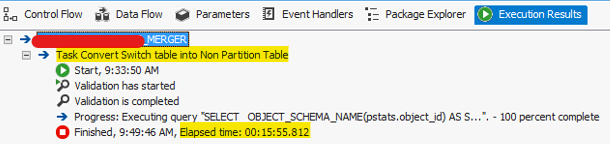
It’s kind of wired, anything of creating clustered index is related with our topic, it looks not, but it does, I found that just by chance, when I rebuild clustered index for partitioned table using with drop_existing, I suddenly realized that the partitioned table become non partitioned table with new clustered index setup. The good thing is that step is really fast, as I mentioned 50 columns and 100mm records partitioned table only takes 15 minutes to become non partitioned table.
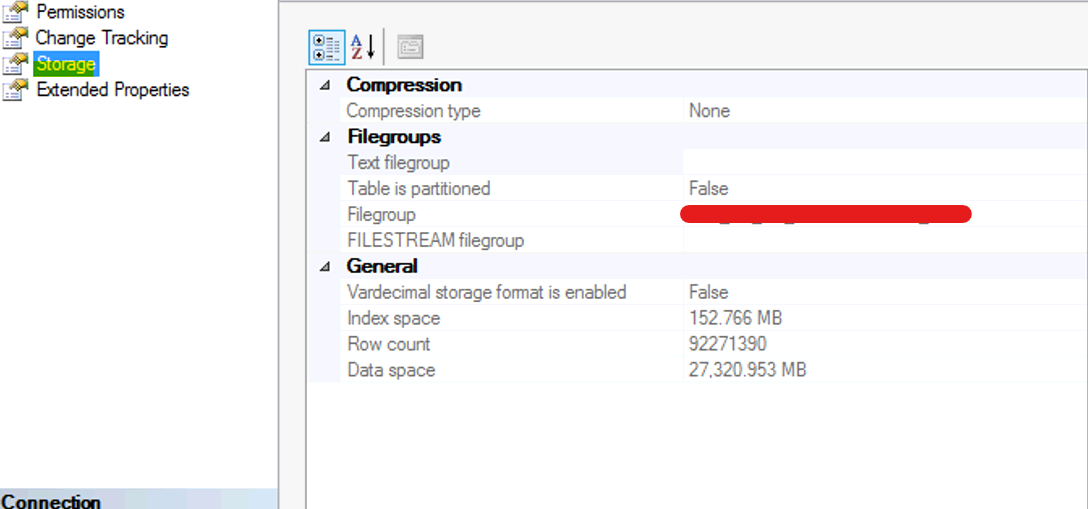
you can know from below screenshot, switch table from partitioned table become non partition table by table property dialogue box
below is the reason why with drop_existing statement is fast from Brian Moran post.
Changing your clustered indexes by using the CREATE INDEX statement’s DROP_EXISTING clause is faster. The DROP_EXISTING clause tells SQL Server that the existing clustered index is being dropped but that a new one will be added in its place, letting SQL Server defer updating the nonclustered index until the new clustered index is in place. (Note that you can use DBCC DBREINDEX to rebuild existing indexes because it won’t cause SQL Server to rebuild a nonclustered index. But you can’t use DBCC DBREINDEX to change the columns in an existing index.) With DROP_EXISTING, you save one complete cycle of dropping and recreating nonclustered indexes. Additionally, SQL Server won’t rebuild the nonclustered index at all if the clustered index key doesn’t change and is defined as UNIQUE, which isn’t an obvious performance benefit of defining a clustered index as UNIQUE. Using the DROP_EXISTING clause can be a huge time-saver when you need to change the clustered index on a table that also has nonclustered indexes.
Workflow of non partitionalize and partition switching
The central idea for the process is use partition switch for every data load both on partition switching from daily transaction table to switch table and from switch table to target transaction monthly table, which promises the best performance.
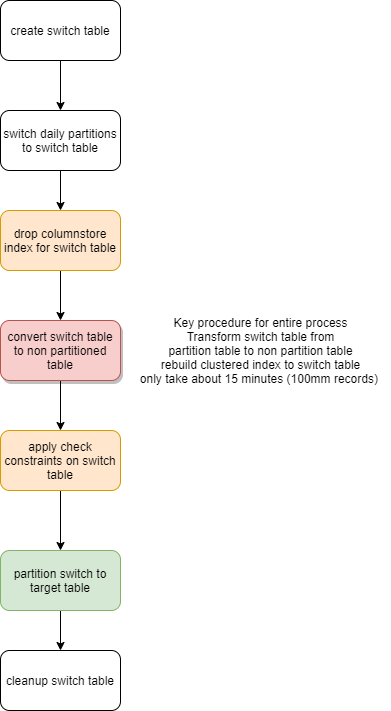
Now, let’s see how do we convert switch table to non partition table
1 | use business_db |
next step is quite essential which is set up check constraints for non partitioned switch table because by partition switch syntax the database engine does partition switching from one source partition number to one target partition number, so check constraint just like a simulation of partition number to let database engine treats it as one partition.
1 | use business_db |
next, we need to rebuild columnstore index for switch table in order to keep the index structure as the same as target transaction table, finally switch partition to target table. You can see we convert switch table from partition table to non partition table instead of partition merging, which only takes 15 minutes instead of 3 hours so that process performance is highly improved.